HF-Pipeline
transformers.pipeline
Pipeline 은 ML 의 여러 단계를 하나로 묶어 한 번에 실행하는 고수준 추론 API 클래스임.
- HF 의 파이프라인이 아닌,
- 일반적인 pipeline 및 scikit-learn의 pipeline은 다음을 참고: scikit-learn: Pipeline 사용법
일반적으로 다음의 단계가 묶임.
- Preprocessing:
- text면 tokenizer,
- image면 image processor 등
- Model (for inference):
- AutoModelFor… 계열 모델 실행
- Postprocessing:
- softmax
- label mapping
- top-k 정리
- 사용자 친화적인 출력 생성.
사용자는 복잡한 ML 작업을 매우 단순하게 하나의 인터페이스로 통합해 수행할 수 있음.
즉, 원래라면 사용자가 직접 작성해야 할 다음의 작업을 안에 숨겨놓은 일종의 Wrapper 임.
- tokenizer 호출
- tensor 생성
- model 호출
- logits 해석
- softmax 및 label 매핑
주로 AutoXXX 클래스와 사용되어 inference에 사용됨.
Class Hierarchy
pipeline은 아래와 같은 class hierachy상 위치를 가짐:
- High-Level API (User Interface)
pipeline():- 사용자가 직접 호출하는 entry point.
- 입력받은 태스크명 에 따라 알맞은 서브 클래스를 인스턴스화함
- Task-Specific Pipelines (Sub-classes)
- ImageClassificationPipeline
- TextClassificationPipeline
- ZeroShotClassificationPipeline
- 이들은 모두
Pipeline이라는 베이스 클래스를 상속받음
- Base Class
Pipeline:model,tokenizer,feature_extractor,image_processor- 등을 멤버 변수로 소유하고 관리함.
Tutorial
- 같이 보면 좋은 gist
1. pipeline 생성과 실행.
from transformers import pipeline

pipe = pipeline("text-classification")
result = pipe("I love this movie.")
print(result)
- "text-classification"은 파이프라인의
task이름
한 줄(line)의 코드로:
- tokenizer가 자동으로 준비되고
- 분류용 모델이 연결되며
- 출력 후처리 로직까지 세팅됨
출력 예시는 다음과 같음:
[{'label': 'POSITIVE', 'score': 0.999}]
list객체로 반환된다는 점label: 예측 클래스score: 신뢰도
이 경우 지정한 task의 기본값으로 설정된 모델이 선택되나 경고 메시지가 뜸.
실무에서 모델을 지정하는 것이 좋음
다음의 코드를 통해, pipe가 사용하는 실제 model이 어떤 클래스인지, tokenizer가 무슨 타입인지 등을 확인할 수 있음.
print(type(clf.model))
print(type(getattr(clf, "tokenizer", None)))
2. 모델을 지정하여 사용하기
from transformers import pipeline

clf = pipeline(
    task="text-classification",
    model="clapAI/roberta-base-multilingual-sentiment",
)

print(clf("난 한국어를 선호해."))
- 모델 미지정으로 기본 모델이 자동 선택되지 않도록 명시적 지정.
text-classification에서 한글을 지원하는 다국어 모델인XLM-RoBERTa계열을 사용한 모델을 지정함.
가능하면 다음도 같이 습관화하는 편이 권장됨.
revision설정 : 커밋 해시 나 태그 를 지정하여 고정(재현성 강화)device또는device_map지정(성능/운영 고려)
3. Zero-Shot 텍스트 분류.
label을 런타임에 지정하여 주는 방식.
zero-shot-classification 은 "후보 라벨을 주면 그중 무엇이 가장 적절한지" 를 추론함.
from transformers import pipeline

zs = pipeline(
    task="zero-shot-classification",
    model="MoritzLaurer/mDeBERTa-v3-base-mnli-xnli",
)

text = "I liked the cinematography, but the story was weak."
labels = ["positive", "negative", "neutral"]

out = zs(text, labels)
print(out)
print(out["labels"])
print(out["scores"])
zero-shot-classification의 pipe라인의 출력 out에서 보통 확인하는 key(키):
sequence: 입력 문장labels: 점수 내림차순 정렬된 라벨scores: 라벨별 점수(정렬된labels와 같은 순서)
다국어/한국어 중심이라면,
label 언어를 다국어/한국어 로 해주고,
hypothesis_template을 설정하는 것이 보다 나은 성능을 보임.
여러 parameters
multi_label=False- 라벨 중 하나만 정답 인 상황(예: 주제 1개만 고르기)
multi_label=True- 여러 라벨이 동시에 성립 가능 인 상황(예: 태그 여러 개)
hypothesis_template- 다국어에서 특히 중요
- 한국어 입력이면 한국어 템플릿을 주는 편이 유리한 경우가 많음
truncation=True, max_length=...- 긴 문서 입력 시 안전장치
- 잘리는 기준이 되므로 실험적으로 조정
batch_size=...- 리스트 입력에서 처리 효율에 영향
- GPU가 있으면 일반적으로 성능향상이 큼.
- CPU 의 경우, padding으로 인해 오히려 성능이 떨어질 수도 있으니 주의.
from transformers import pipeline
import torch

# 1) 파이프라인 생성 (모델 명시 - 경고 회피)
MODEL_ID = "MoritzLaurer/mDeBERTa-v3-base-mnli-xnli"
zs = pipeline(
    task="zero-shot-classification",
    model=MODEL_ID,
    device=0 if torch.cuda.is_available() else -1,
)

# 2) 입력/라벨 준비
text = "이 문서는 환자 진료 기록을 요약하고, 치료 계획과 예후를 설명합니다."
labels = ["의료", "법률", "금융", "교육", "기술"]

# 3) (중요) hypothesis_template
# - 모델이 NLI 기반으로 "text" (premise) 와 "가설 문장" (hypothesis) 쌍을 만들어 판단합니다.
# - 라벨을 {}에 끼워 넣어 hypothesis를 구성합니다.
# - 다국어/한국어 입력이면 한국어 템플릿이 대개 유리합니다.
hypothesis_template_ko = "이 글의 주제는 {}이다." # {} 안에 빈 칸 넣으면 에러발생함. 주의!

# 4) (중요) multi_label
# - False: 라벨이 상호배타적(하나만 정답)인 상황 가정 -> softmax로 정규화 경향
# - True : 여러 라벨이 동시에 참일 수 있는 상황 가정 -> 각 라벨을 독립적으로 판단하는 쪽으로 동작
out_exclusive = zs(
    text,
    candidate_labels=labels,
    multi_label=False,
    hypothesis_template=hypothesis_template_ko,
    # 5) 입력 처리 옵션 (파이프라인이 tokenizer에 전달)
    truncation=True,
    max_length=256,
)

out_multilabel = zs(
    text,
    candidate_labels=labels,
    multi_label=True,
    hypothesis_template=hypothesis_template_ko,
    truncation=True,
    max_length=256,
)

print("=== multi_label=False (상호배타) ===")
print(out_exclusive["labels"])
print(out_exclusive["scores"])

print("\n=== multi_label=True (복수 선택 가능) ===")
print(out_multilabel["labels"])
print(out_multilabel["scores"])
다음은 batch_size 를 사용하는 예임.
texts = [
    "이 영화는 연출이 훌륭했지만 스토리가 약했습니다.",
    "환자 통증이 지속되어 추가 검사와 처치가 필요합니다.",
    "주식 시장 변동성 확대에 따라 리스크 관리가 중요합니다.",
    "딥러닝 모델의 추론 최적화와 배포 전략을 논의합니다.",
]

labels = ["의료", "금융", "엔터테인먼트", "기술"]

# list로 넘기면 내부에서 각각 처리함.
# 굳이 loop를 만들 필요 없음.
outs = zs(texts,
          candidate_labels=labels,
          multi_label=True,
          hypothesis_template="이 문장의 주제는 {}이다.",
          truncation=True,
          max_length=192,
          batch_size=16,
	  top_k = 4,     # top 2 선택
)

# top 2 선택
for t, o in zip(texts, outs):
    print("\n---")
    print(t)
    print(list(zip(o["labels"], [round(s, 4) for s in o["scores"]])))

print( "=======================")
# --- threshold 적용 ---
THRESHOLD = 0.5

# --- top 4 선택 ---
for t, o in zip(texts, outs):
    print("\n---")
    print(t)
    print(list(
        zip(
            o["labels"],
             [round(s, 4) for s in o["scores"] if s>=THRESHOLD]
            )
        )
    )
- Thresholdind 의 경우, 아무것도 없을 수 있음.
- 최대 점수를 받은 라벨을 하나 강제 선택하는 것도 방법임.
4. 이미지 분류 (ViT)
다음은 image를 사용하는 경우임.
from transformers import pipeline
from PIL import Image
import requests

img_url = "https://huggingface.co/datasets/huggingface/documentation-images/resolve/main/cats.png"
image = Image.open(requests.get(img_url, stream=True).raw)

img_clf = pipeline(
    task="image-classification",
    model="google/vit-base-patch16-224",
)

results = img_clf(image)
print(results[:5])
"image-classification"task는 기본적으로google/vit-base-patch16-224모델 사용.- 이 모델은 ImageNet-1k라는 방대한 이미지 데이터셋으로 학습됨.
- 1,000개의 클래스로 이루어진 라벨!
5. pipeline 살펴보기.
pipeline을 호출시 파라메터로 받아들이는 인자들은 다음의 코드로 확인 가능함
(Pipeline 이 callable객체이기 때문)
import inspect
print(inspect.signature(pipe.__call__))

# 각 파라미터 정보 출력
print("\nParameters:")
for name, param in signature.parameters.items():
    print(f"- {name}: kind={param.kind}, default={param.default}, annotation={param.annotation}")
- task별로 호출 규약이 다름.
반환되는 output은 dictionary 객체이므로 다음으로 확인 가능
print("--- output.keys()를 리스트로 변환하여 display()로 출력 ---")
display(list(output.keys()))

print("\n--- 각 키를 줄바꿈하여 출력 ---")
for key in output.keys():
    print(f"- {key}")
Pipeline이 사용하는 모델의 명세는 pipe.model.config를 통해 확인하면 됨.
print(f"id2label 개수: {len(classifier.model.config.id2label)}")
print(f"label2id 개수: {len(classifier.model.config.label2id)}")
로컬에 저장 경로
Pipeline으로 특정 task 에 관련된 모델과 컴포넌트들을 HF Hub로부터 가져오면 다음의 cache directory 에 저장된다.
Linux/macOS
~/.cache/huggingface/
Windows
C:\Users\<USERNAME>\.cache\huggingface\
내부의 실제 저장 구조는 대략 다음과 같음:
~/.cache/huggingface/ # Windows는 경로가 조금 다름.
 └─ hub/
    └─ models--{org}--{repo_name}/
       ├─ refs/
       │  └─ main
       ├─ snapshots/
       │  └─ <commit_hash>/
       │     ├─ config.json
       │     ├─ model.safetensors
       │     ├─ tokenizer.json
       │     ├─ preprocessor_config.json
       │     └─ README.md
       └─ blobs/
- Hub의 Git commit 기반 버전 관리를 그대로 반영
- 동일 repo라도
- 다른 commit
- 다른 revisi0on(tag, branch)
- 의 경우, 서로 다른 snapshot으로 공존 가능
<commit_hash>밑의 파일들에 대해 좀 더 자세히 살펴보려면 [[/hf/pipeline_repo]] 를 참고.
참고로, 다른 cache directory (root)를 지정할 수도 있음:
pipeline(
    task,
    model="repo_id",
    cache_dir="/my/local/cache"
)
주요 Pipeline taks list
다음의 task를 지원함. 적절한 모델은 HuggingFace Hub 의 모델에서 찾을 수 있음 https://huggingface.co/models
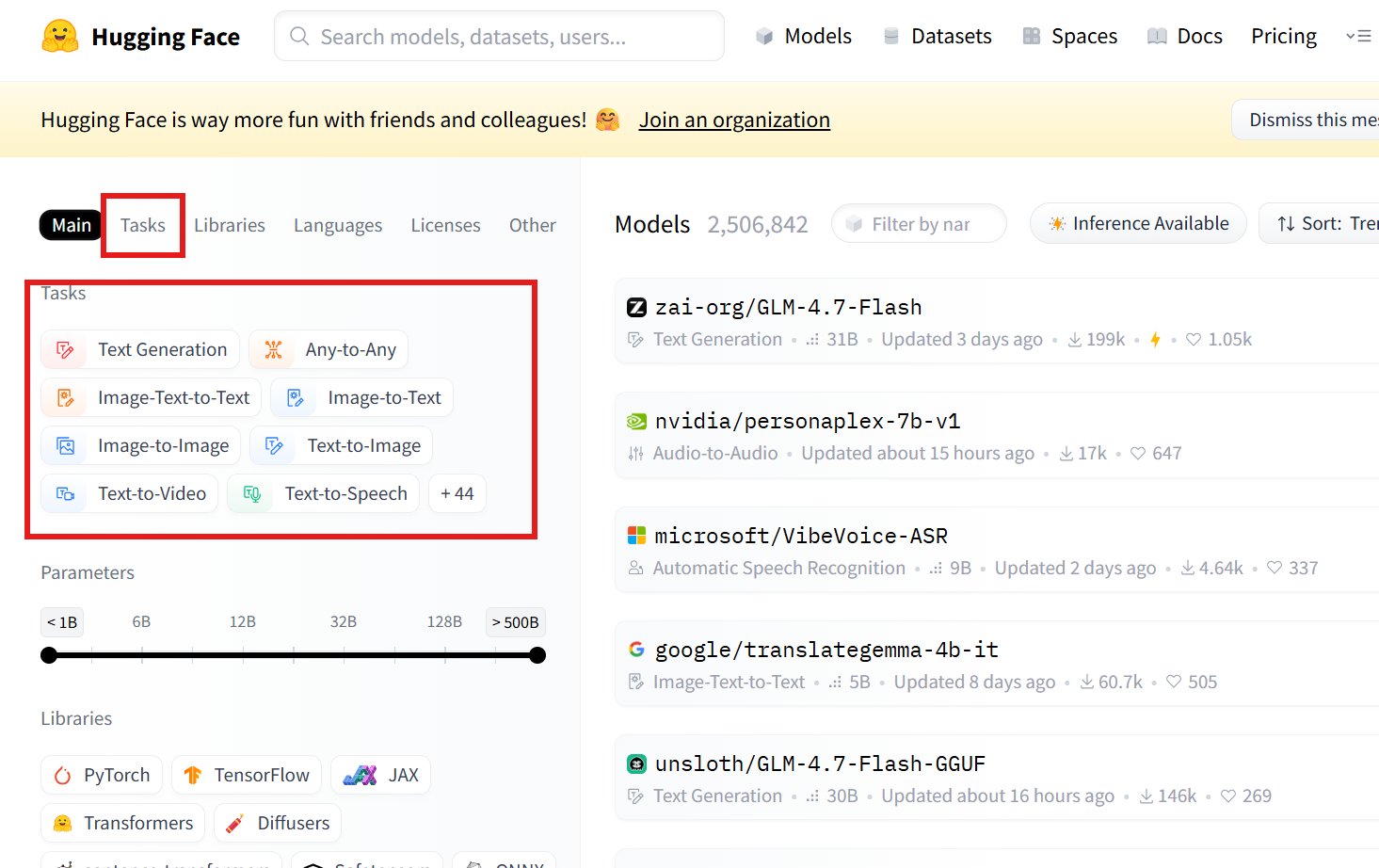
정말 정확한 건 src를 참고하는 것임.
transformers.pipelines.__init__.py
SUPPORTED_TASKS딕셔너리의 키를 참고!
A. 텍스트(Text) 계열
| task 문자열 | 설명 | Pipeline 클래스 | postprocess() 동작 요약 | 공식 문서 |
|---|---|---|---|---|
text-classification |
문장/문서 분류 (sentiment analysis 포함) | TextClassificationPipeline |
logits에 sigmoid(단일 라벨) 또는 softmax(다중 라벨) 적용 후, id2label로 라벨명을 붙여 [{label, score}] 반환 (top-k 가능) |
link |
token-classification |
토큰 단위 분류 (NER 등) | TokenClassificationPipeline |
토큰별 logits -> 라벨/점수로 변환 후, 서브워드/연속 토큰을 엔티티로 aggregation하여 entity/score/word/start/end 형태 리스트 반환 |
link |
question-answering |
Extractive QA | QuestionAnsweringPipeline |
start/end logits로 후보 span 점수 계산 -> 최적 span 선택 -> answer, score, start, end(context 내 문자 인덱스) 반환 |
link |
text-generation |
자동 텍스트 생성 (causal LM) | TextGenerationPipeline |
generate() 결과 토큰을 디코딩하여 generated_text 생성 (옵션에 따라 prompt 포함/제외, 여러 시퀀스 반환) |
link |
text2text-generation |
Seq2Seq 생성 (번역, 요약 등) | Text2TextGenerationPipeline |
generate() 결과를 디코딩하여 generated_text 반환 (task별로 키 이름만 달라질 수 있음) |
link |
summarization |
문서 요약 | SummarizationPipeline |
seq2seq 생성 결과를 디코딩하여 summary_text 반환 |
link |
translation_xx_to_yy |
기계 번역 | TranslationPipeline |
seq2seq 생성 결과를 디코딩하여 translation_text 반환 |
link |
fill-mask |
마스크 토큰 예측 | FillMaskPipeline |
[MASK] 위치의 분포에서 top-k 토큰을 뽑아 sequence, token_str, score 등을 반환 |
link |
feature-extraction |
hidden state / embedding 추출 | FeatureExtractionPipeline |
모델 출력 hidden states(대개 last_hidden_state 등)를 그대로 추출해 배열/리스트 형태로 반환 | link |
B. 비전(Vision) 계열
| task 문자열 | 설명 | Pipeline 클래스 | postprocess() 동작 요약 | 공식 문서 |
|---|---|---|---|---|
image-classification |
이미지 분류 | ImageClassificationPipeline |
logits -> softmax 후 label, score로 정렬해 top-k 반환 |
link |
image-segmentation |
이미지 분할 | ImageSegmentationPipeline |
픽셀 단위 예측을 마스크/세그먼트로 변환하고, label/score 및 마스크(또는 맵) 반환 |
link |
object-detection |
객체 탐지 | ObjectDetectionPipeline |
예측 박스를 이미지 좌표계로 변환하고 NMS 등 적용 후 box, label, score 리스트 반환 |
link |
depth-estimation |
깊이 추정 | DepthEstimationPipeline |
모델 출력 depth를 depth map(예: PIL/ndarray)로 변환해 반환 | link |
image-to-text |
이미지 캡셔닝 | ImageToTextPipeline |
generate() 결과를 디코딩하여 캡션 텍스트 generated_text 반환 |
link |
C. 오디오(Audio) 계열
| task 문자열 | 설명 | Pipeline 클래스 | postprocess() 동작 요약 | 공식 문서 |
|---|---|---|---|---|
automatic-speech-recognition |
음성 인식 (ASR) | AutomaticSpeechRecognitionPipeline |
디코딩(CTC/seq2seq)에 따라 text 생성, 옵션에 따라 chunk/timestamp 정보 포함 가능 |
link |
audio-classification |
오디오 분류 | AudioClassificationPipeline |
logits -> softmax 후 label, score top-k 반환 |
link |
text-to-speech |
음성 합성 (TTS) | TextToSpeechPipeline |
생성된 waveform을 정리해 audio(샘플 배열)와 sampling_rate 등을 반환 |
link |
D. 멀티모달(Multimodal) 계열
| task 문자열 | 설명 | Pipeline 클래스 | postprocess() 동작 요약 | 공식 문서 |
|---|---|---|---|---|
zero-shot-image-classification |
텍스트 조건 기반 이미지 분류 | ZeroShotImageClassificationPipeline |
이미지-텍스트 점수(유사도)를 정규화해 label, score로 반환 (candidate labels 기반) |
link |
visual-question-answering |
이미지 기반 질문 응답 | VisualQuestionAnsweringPipeline |
(대개) 답 후보 분포에서 최적 답을 선택해 answer, score 형태로 반환 |
link |
document-question-answering |
문서 이미지 기반 Extractive QA | DocumentQuestionAnsweringPipeline |
start/end logits(문서 토큰/OCR 토큰 기준)로 최적 span 선택 -> answer, score, start, end 반환 |
link |